

Frequently Asked
Questions
Find answers to common questions about our banking services and products.
Vivid Savings
The Vivid Card is a prepaid card jointly issued by Singapura Finance Ltd and MatchMove Pay Pte Ltd under the Mastercard brand name. It can be used on any Mastercard Point-of-Sale worldwide and online shopping as a payment option. It is not a credit or debit card. For more details, please refer to the FAQ on the Vivid Card below.
2. Can I transfer money from my Vivid Savings Account to another bank account with another financial institution?
Yes, you can. You can transfer money from your Vivid Savings Account to any local bank account. To perform the fund transfer, please use our SFL Go internet banking platform.
For more information on using and installing the SFL Go app, please refer to our website at https://www.singapurafinance.com.sg/everyday-banking-tools.
3. Can I withdraw money from my Vivid Savings Account, Vivid e-Wallet or Vivid Card at the local ATM in Singapore?
No. This option is currently not supported.
4. How do I check the balance of my Vivid Savings Account?
You can send an SMS request to request for the transaction history or the balance of your Vivid Savings Account. For more details, please refer to https://www.sfl.sg/everyday-banking-tools. We will also send monthly e-statements to your registered email account.
You can also use our SFL Go internet banking platform to check your account balance and details. For more information on using and installing the SFL Go app, please refer to our website at www.sfl.sg/everyday-banking-tools.
5. I have never heard of Singapura Finance. How safe is my money with you?
We are established in the 1950s and are listed on the SGX. Singapura Finance is a member of the Singapore Deposit Insurance Corporation. This means that as with all other full banks in Singapore, your deposits with us are insured up to $100,000 in aggregate per depositor per Scheme member by law.
The Vivid Savings Account is an online savings account that offers one of the highest savings interest rate in Singapore without multiple qualifying conditions.
2. How is it different from your traditional/usual savings account?
This is an online account which you can open online and perform transactions without the need to visit our Customer Centres. It comes with a Vivid e-Wallet and a Vivid Card to facilitate cashless transactions.
3. Why is the interest rate higher than the usual savings account?
The Vivid Savings Account is an online account that requires minimum human interaction. Our savings on manpower and other incidental costs are passed on to you in the form of higher interest rates. For this reason, you will not be able to perform over-the-counter(OTC) banking transactions. If you require an OTC transaction, there will be a fee charged. At this moment in time though, fees are waived until further notice.
4. Is there a catch to qualify for the higher interest rate?
Higher yield accounts generally have multiple criteria that need to be met. At Singapura Finance, you just need to open an account with a initial deposit of $500.00 and maintain a balance of $200.00 at all times.
5. Who can apply for the Vivid Savings Account?
Singaporean or Permanent Residents aged 16 years old or older.
6. Can I open this account with my spouse or parents?
No. Vivid Savings Account can only be opened in a single person's name.
7. What is the initial deposit? Minimum amount to open the account?
An initial deposit of $500.00 is required to open the account. After which, a minimum of $200.00 must be maintained.
8. Is there any fall-below-fee if my balance falls below the required amount?
As this is a savings account, there will not be any fall-below-fee charged. However, if your balance falls below $200.00, we will request that you close the account. Terms and conditions for early closure or termination will apply,
9. Can I open the Vivid Savings Account at any Customer Centres?
You can open the account from the comfort of your home or office using your own mobile devices or computer. However if you need assistance, our Customer Service Officers at the various Customer Centres can assist and guide you through the process of an application online using your mobile or portable devices.
10. Where do I locate your Customer Centres and what are their opening hours?
Please refer to our website https://www.sfl.sg/contact-us for the location of our Customer Centres and their respective operating hours.
11. I have submitted my application online. When will I be notified of my account status?
Applicants will be notified of the account status within 3-5 business days via SMS and email. Thereafter, you need to complete the steps contained in the email.
12. I have forgotten my Singpass account. Can I open the account without one?
Your Singpass account is needed to allow MyInfo to retrieve personal data to pre-fill the relevant fields for account opening. Please visit https://www.singpass.gov.sg and follow their instructions to reset your Singpass account.
13. Why can't I edit my information on the pre-filled fields on the application page?
Information is retrieved directly from the government web-site at MyInfo. Kindly visit MyInfo or contact the relevant government agency to update your latest information.
14. My details pre-filled on the application is not correct/up to date. How do I update it?
If the information is incorrect, kindly visit MyInfo or contact the relevant government agency to update your latest information.
15. I just updated MyInfo with the change of information. Why isn't this reflected in my Vivid Savings Account details?
MyInfo currently does not share deals of its users' change of information. Please proceed to https://sfl.sg/everyday-banking-tools and use MyInfo to update your contact information with us.
16. Why was my application rejected?
All applications go through an approval process. For confidentiality purposes, we are unable to reveal why your account application was unsuccessful.
17. Can I deposit/withdraw my money over the counter?
In line with our Government's policy towards a cashless society, deposits can be made via PayNow to Singapura Finance UEN 196900340N by indicating your account number under the Reference field. Customers are also encouraged to make use of the Vivid Card to perform transactions without having to visit our Customer Centres.
There will be a $3.00 fee per transaction if you wish to perform a deposit/withdrawal over the counter. However, this transaction fee will be waived until further notice.
18. How do I activate my account?
Simply transfer a minimum deposit of $500.00 via PayNow to Singapura Finance UEN 196900340N by indicating your account number under the Reference field to activate your account.
19. I have activated my Vivid Savings Account but I did not receive my Vivid Card.
Your Vivid Card will be mailed to your registered address or mailing address within 7-14 business days after the creation of your Vivid e-Wallet on your mobile device and the successful activation of your account. Watch for our SMS and email notification.
20. I submitted more than one application due to change in my details. How do I ensure the correct details are registered?
Kindly contact our Customer Service Hotline or visit www.sfl.sg to submit an enquiry form.
21. I would like to place a fixed deposit using my money in the Vivid Savings Account. Do I have to pay for the transaction fee?
There will be no transaction fee imposed on fixed deposit whereby funds are debited directly from your Vivid Savings Account. Blue Sky Fixed Deposits will require you to visit our Customer Centres wheras Vivid Fixed Deposits can be done online.
22. Can I close my Vivid Savings Account whenever I want?
There will be a total early closure fee of $55.00 for account closed within 6 months after opening. This comprises of $25.00 for the closure of the Vivid Savings Account and $30.00 for early termination of the Vivid Card.
23. I wish to close my Vivid Savings Account. How do I do that?
Firstly, please ensure you have already uploaded a signature for your account. Please visit any of our Customer Centres to close your Vivid Savings Account. Do note that your Vivid e-Wallet and Vivid Card will automatically be terminated once your account is closed.
24. I have $3,000.00 in my Vivid Savings Account. Is it covered by the Singapore Deposit Insurance Corporation (SDIC)?
Yes. Your deposit with Singapura Finance is cover under SDIC for up to $100,000 in aggregate per depositor per Scheme member by law.
25. I did not receive my Vivid Savings Account passbook.
The Vivid Savings Account is an online account. No physical passbook will be issued. You may request for your statement online through our SMS Services at https://sfl.sg/everyday-banking-tools (SMS Banking).
26. I have an existing savings account with Singapura Finance. Can I convert this to the Vivid Savings Account?
No. This option is not available. You will have to close the existing account at our Customer Centre and open the Vivid Savings Account separately online or keep the existing savings account and open a separate Vivid Savings Account online.
27. Can I transfer my funds from my Vivid Savings Account to my other bank accounts?
Yes, you can. Fund transfers can be done through the SFL Go internet banking platform or SFL go app. Instructions can be found on our website at www.sfl.sg/everyday-banking-tools.
28. Can I make payment from my Vivid Savings Account to my friend?
Yes, you can transfer money from your Vivid Savings Account to your friend's local bank account. To perform the fund transfer, please use our SFL Go internet banking platform.
For more information on using and installing the SFL Go app, please refer to our website at www.sfl.sg/everyday-banking-tools.
29. I deposited $500.00 via e-payment services to my Vivid Savings Account at 8 a.m. this morning. However, I still cannot see the new balance in my account now at 12 noon. Why is this so?
Deposits made through 3rd party e-payment providers are received by us on a batch basis. As such, we are not able to credit the money to the Vivid Savings Account immediately as a general rule. Deposit made before 4 p.m. on a working day will be credited to the account on same day. Payment made after 4 p.m. on a working day or on a weekend/public holiday will be credited on the next working day.
30. I deposited $500.00 via PayNow to my Vivid Savings Account at 10 a.m. this morning. However, I still do not see the new balance at 2 p.m. Why is this so?
Deposits made through PayNow does not have a fixed format reference field so we have to verify each PayNow transaction before crediting it to your account. Your account will be credited on the same day as long as payments are made before 4 p.m. on a working day. Payments after 4 p.m. on a working day or on a weekend/ public holiday will be credited on the next working day.
31. Is there a cap on the amount that I can transfer from my Vivid Savings Account to the Vivid e-Wallet/Vivid Card?
You can only transfer a maximum of $500.00 per day from your Vivid Savings Account to your Vivid e-Wallet.
32. I received an SMS stating that my account is turning dormant. What does this mean?
Your Vivid Savings Account will be "Dormant" if the account has no transactions for a year. If your account is dormant, you will not be able to transfer funds into the Vivid e-Wallet. We will send you an email and SMS notification 30 days before your account turn dormant. Simply perform any transaction with your Vivid Savings Account, for example, deposit money via PayNow, to keep your account active.
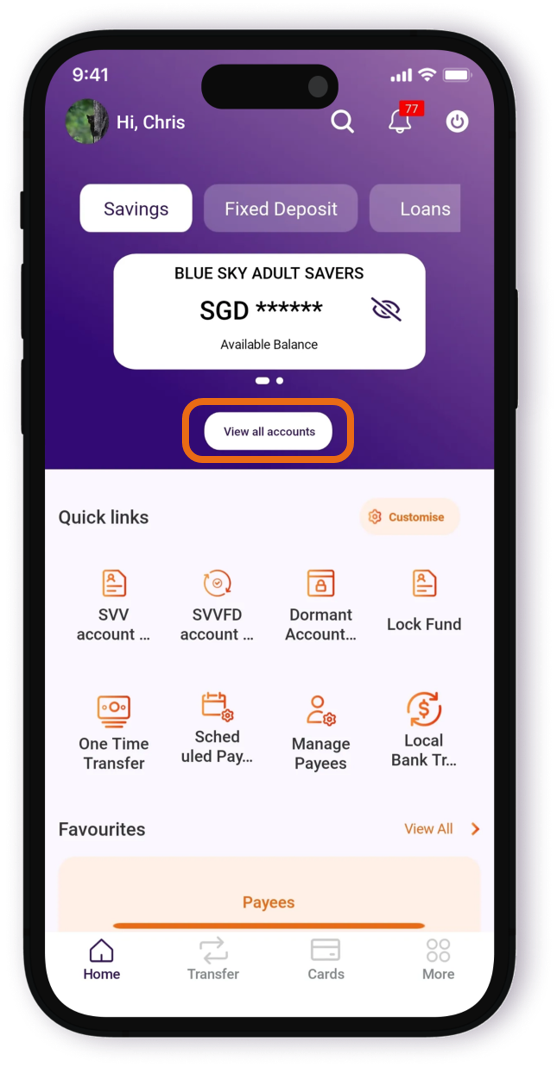
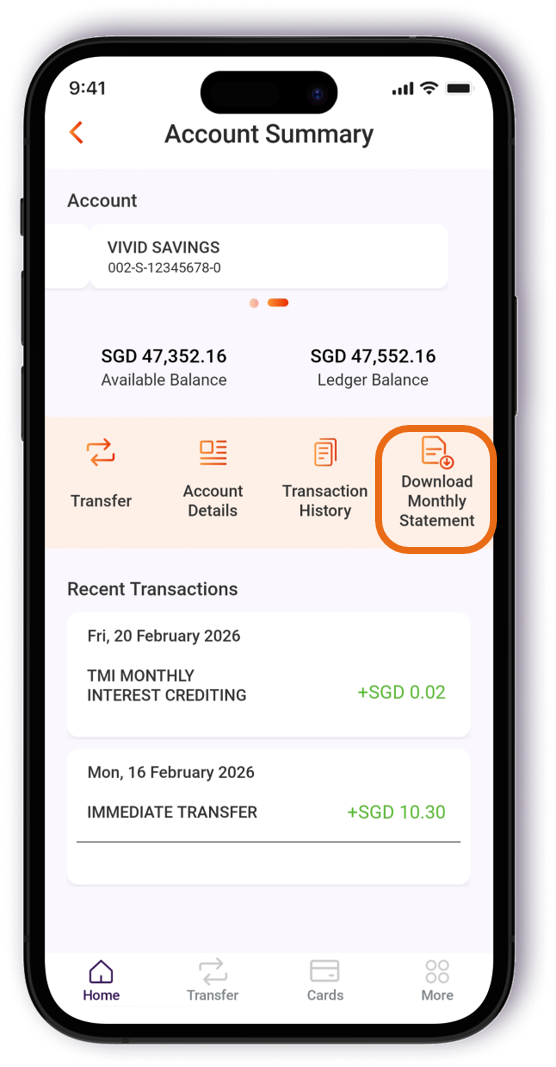
From 1 July 2026, monthly e-Statements will no longer be sent via email attachments. Monthly e-Statements can be accessed directly via the SFL Go ibanking platform by following these steps:
Sign in to SFL Go app
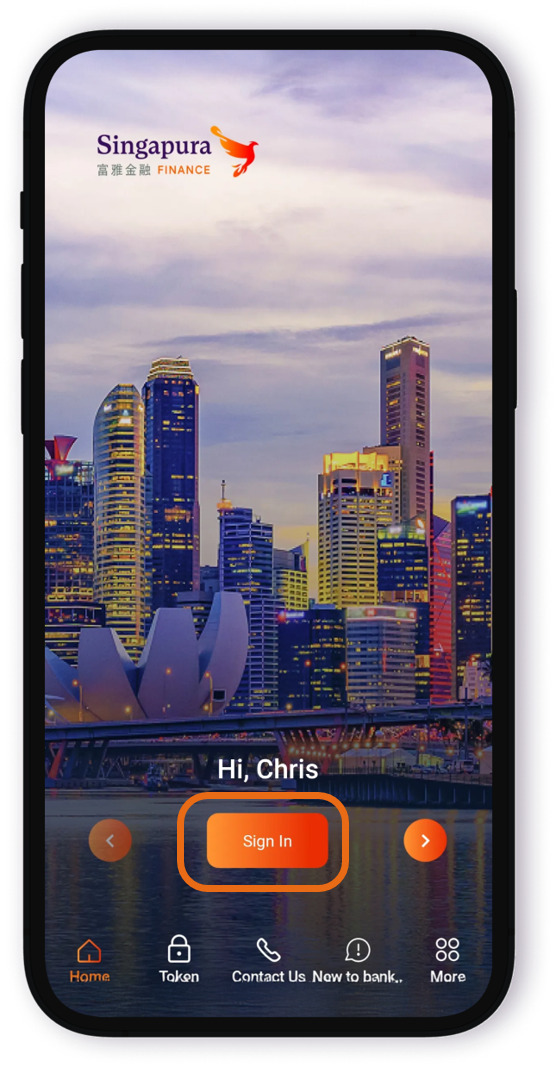
Tap on "View all accounts" to select "VIVID SAVINGS"
Tap on "Download Monthly Statement"
SFL Go app can be downloaded from Google Play and Apple App Store.
2. Is there any charge for viewing or downloading the Vivid Savings Account Monthly e-Statement?
No, the e-Statement service is provided free of charge.
3. When will my Vivid Savings Account Monthly e-Statement be available?
The e-Statement will be made available on every 5th day of the month.
4. Can I download and save my current and past months' Vivid Savings Account e-Statement?
Yes, you can download and save your current month's e-statement, as well as e-statements from the last 3 months to your device for future reference.
E.g. In June 2026, the available e-Statements would be:
• June 2026 (current month); and
• May 2026, April 2026 and March 2026 (last 3 months)
5. If I need more than the last 3 months' Vivid Savings Account e-Statements, what should I do?
Please contact our Customer Service Hotline 6880 0668 for further assistance. There will be nominal service fee charge per retrieval.
6. I noticed an error in my Vivid Savings Account Monthly e-Statement, what should I do?
Please contact our Customer Service Hotline 6880 0668 as soon as possible for further assistance.
7. I am unable to open the downloaded Vivid Savings Account Monthly e-Statement, what should I do?
Please ensure that a PDF reader is installed on your device to open the downloaded e-Statement. If you are still unable to access the document, please contact our Customer Service Hotline 6880 0668 for assistance.
It is a mobile app linked to the Singapura Finance Vivid Savings Account and Vivid Prepaid Mastercard. It allows customers to manage their Vivid Savings Account and Vivid Prepaid Card digitally and perform card-related transactions conveniently from the phone.
The app can be downloaded from the official App Store (for iPhones) or Google Play (for Android phones). Please note that mobile phone on other systems and non-mobile devices such as iPad and tablets are not supported.
2. What can I do with the Vivid e-Wallet?
With the Vivid e-wallet app, you can:
• View your Vivid Card transaction history
• Transfer funds between your Vivid Savings Account and e-Wallet
• Top-up or unload funds from the Vivid Card
• Generate dynamic CVC codes for safe online shopping
• Access card-related features and controls
3. Why do I need to have the Vivid e-Wallet?
The Vivid e-Wallet is required to enable you to transfer funds to/from your Vivid Savings account to the Vivid e-Wallet and to the Vivid Prepaid Mastercard for better spending management.
We encourage customers to install the e-Wallet app to access and manage their Vivid Savings Account and Vivid Prepaid Card conveniently.
4. What if I don't install the Vivid e-Wallet?
Without the Vivid e-Wallet, you will be unable to manage the Vivid Card to perform digital transactions and make full use of digital functions of your account.
5. How can I top up my Vivid e-Wallet?
You can top up/load your Vivid e-Wallet by selecting "Top Up" on the home page of the mobile app. Funds will be withdrawn from your Vivid Savings Account and credited to your Vivid e-Wallet. You will receive an OTP on your registered mobile number to validate your transaction request.
6. Is there a maximum/minimum amount that I can top up to my Vivid e-Wallet from my Vivid Savings Account?
The minimum amount is $10.00 and the maximum amount is $500.00 per day.
7. I have transferred/top up $500.00 from my Vivid Savings Account to my Vivid e-Wallet. Is this amount covered under SDIC?
The SDIC only protects the deposits in your Vivid Savings Account. Funds cover your deposits in the Vivid Savings Account. Funds stored in the Vivid e-Wallet and/or Vivid Card are not insured by SDIC.
8. I have $3,000.00 in my Vivid e-Wallet. Is it covered by SDIC?
SDIC only insures the deposits in your Vivid Savings Account, not the Vivid e-Wallet or Card.
9. What is the maximum amount that I can store in my Vivid e-Wallet?
The maximum amount allowed to be stored in the Vivid e-Wallet at any one time is $3,000.00. The total in both the Vivid e-Wallet and Card cannot exceed this amount. For example, if you have $1,200.00 in the e-wallet, you may only have $1,800.00 stored in the Card.
10. Where do I view my Vivid e-Wallet balance?
Vivid e-Wallet balance will appear on the main menu / home page of the Vivid e-Wallet app on your mobile device. Do note that your Vivid e-Wallet balance and Vivid Card balance may be different as you can allocate different amount between the Vivid e-Wallet and the Vivid Card.
11. Can I use the money in my Vivid e-Wallet to pay for purchases such as Grab ride, online shopping etc?
This function is currently not supported. To make payment, please use your Vivid Card.
12. How do I close my Vivid e-Wallet?
Transfer the value in your Vivid Card to your e-Wallet. Once the entire amount is there, select "Transfer to Vivid Savings Account". You may then close the Vivid Savings Account by visiting any of our Customer Centres. Before doing so, please ensure that your signature has already been updated online.
A flexible alternative to cash or bank cards, the Vivid Card can be used to make purchases, pay bills or shop online that same way as you would with a credit or debit card. Jointly issued by Singapura Finance and MatchMove Pay, you get to enjoy the power of Mastercard with the security of prepraid.
2. How is the Vivid Card different from a credit card?
A credit card allows you to purchase first and pay later but you also risk having to pay high interest and late payment fees. The Vivid Card is a preloaded card which helps prevent overspending. There are no annual fees or interest charges.
3. What is the advantage of having a Vivid Card as compared to a credit card/debit card?
The main advantage of a prepaid card is that in the event that a prepaid card is stolen or the account hacked into, the amount of loss is limited to the amount remaining on the card unlike in the case of a credit card where the loss can be up to the full amount of the unused portion of your credit limit or the full amount in the savings account in the case of a debit card.
With the Vivid Card, the cardholder can further limit his loss further by unloading the unused money from the card back to the e-wallet.
There is no minimum income requirement to apply for a Vivid Card unlike a credit card where current legislation requires the cardholder to have a minimum annual income of $30,000.00 to qualify.
The Vivid Card also comes with a dynamic CVC for online purchases. Dynamic CVCs prevent fraudsters from making recurring payments as the number changes at regular intervals. This means that if the card is lost or your online shopping account is hacked, the fraudster will not be able to use the card.
4. Why should I apply for the Vivid Prepaid Mastercard instead of any other prepaid card?
Unlike a standalone prepaid card, the Vivid Card is linked to the Vivid Savings Account so you have the advantage of earning interest on your funds while enjoying the convenience of transferring money to and from your card with no additional fees.
The Vivid Card also comes with a dynamic CVC for online purchases. This means if the card is lost or your online shopping account is hacked, the fraudster will not be able to use the card since it will become unusable without a static CVC.
5. How can I get my Vivid Card?
The Vivid Card comes with the Vivid Savings Account and will be mailed to your registered address with Singapura Finance within 7-14 days after the creation of the Vivid e-Wallet account.
6. Can I apply for a Vivid Card without opening a Vivid Savings Account?
No, the Vivid card is linked to the Vivid Savings Account and cannot be applied for separately.
7. I am a retiree/unemployed. Can I apply for the Vivid Card?
Yes, you may as long as you open a Vivid Savings Account. In fact the Vivid Savings Account is particularly suitable for retiree and senior citizens who no longer qualify for a credit card but wish to enjoy the conveniences of a credit card and enjoy a high savings interest rate at the same time.
8. I have received my Vivid Card. How do I activate it?
You are required to log in to your account using the mobile number and email address registered with Singapura Finance to use the Mobile Application. Enter your 12 digit card number provided in the welcome kit to activate your new Vivid Card.
9. Can I perform a cash withdrawal from local ATM machine?
No. Singapura Finance does not operate any physical ATMs. In line with the government policy of promoting a cashless society, cash withdrawals from other financial institutions' ATM machines is not an option.
10. Can I perform a cash withdrawal from overseas ATM?
Yes, you can but you will need to request for a PIN. A fee of $5.00 is chargeable each time to enable or reset the PIN and the fee will be deducted from your account. In addition, the banks operating the ATM will impose a fee for each transaction performed at their ATM. For more details on the related charges, please refer to https://sfl.sg/personal/vivid-savings#fees-charges. To request for a PIN, please call our Customer Service Hotline at 6880 0668 during office hours. The $5.00 fee will be debited from your Vivid Savings Account and the PIN will be sent to you directly via SMS.
11. How do I top up my Vivid Card?
You can top up your Vivid Card through the Vivid e-Wallet with the following steps:
Select "Cards" > Select "Load" > Key in the amount you wish to top up
12. What is the maximum amount that I can store in my Vivid Card?
You can store a maximum of $3,000.00 on your Vivid Card. However, this amount is the maximum limit for the Vivid e-Wallet and the Vivid Card combines. As an example, if you have $1,800.00 in your e-wallet, then you can only store a maximum of $1,200.00 on your Vivid Card.
13. How do I transfer funds from Vivid Card to Vivid e-Wallet?
Select "Cards" > Select "Unload"
14. My Vivid Card has been debited even though the order status is "unsuccessful". What should I do?
When the money is deducted even though the transaction failed to go through, it's usually a temporary "pending" charge that will be reversed immediately or within a few business days. In case the transaction has gone through, Mastercard's process of refund can take 7-14 days.
15. Can I use the Vivid Card on buses and the MRT?
Yes, you can. Tap it at the card reader on buses or the MRT fare gate as you would usually do with your travel card.
16. How can I view my fare on the Vivid Card?
To see the full fare details, you will need to add the Vivid Card into the SimplyGo account on the TransitLink SimplyGo Portal or TransitLink SimplyGo Mobile App. You can view your travel history there.
17. Are there any extra charges when using my Vivid Card for public transport?
No, the fares are the same as travel card fares.
18. Will the fare amount be displayed on the fare reader when I tap to exit using my Vivid Card?
When using your Vivid Card for transit payment, the fare reader will display "Bank Card Usage" when you tap to enter or exit.
19. Why was there a $0.10 charged by LTA when I used my Vivid Card for public transport?
This is a preauthorized amount that is charged to ensure that the card is valid. It will be refunded to you.
20. How will my transit fees be charged?
The fares will be accumulated to Vivid Card for up to 5 days, or after every 21 transactions, or after a total of $15.00 has been spent, whichever occurs first.
21. Can I use the Vivid Card for online purchase?
Yes, you can. The Vivid Card is accepted on all sites that accepts Mastercard payment.
22. I keyed in the CVC "888" on the back of my card for an online purchase and it was rejected. What happened?
“888” is not the actual CVC for your card as the Vivid Card uses a dynamic CVC to protect against fraud. To generate a CVC, go to the Vivid e-Wallet app and select “generate CVC” to obtain your dynamic CVC number. This number will change with each purchase.
23. Can I add the Vivid Card to other online merchants' e-Wallet like Grabpay or Lazada?
Generally you should be able to add the Vivid Card to most online merchants' e-wallet. When adding the details of the Vivid Card, you will have to request for the CVC by selecting "Generate CVC" on the Vivid e-Wallet app to add your card.
24. Can the Vivid Card be used with other online payment wallets such as Google Pay, Samsung Pay or Apple Pay?
Yes, you can add the Vivid Card to GPay(Google), Samsung Pay and Apple Pay.
25. Do I need to sign on the back of the Vivid Card?
No. From October 2018, Mastercard no longer requires a signature on the back of a Mastercard or for merchants to collect a signature upon payment. However, it is advisable for you to do so as a measure against fraud.
26. I lost my Vivid Card. How do I block the card?
You should immediately unload/transfer any remaining money from the Vivid Card to your Vivid e-Wallet. Thereafter, you can request for a new Vivid Card.
Singapura Finance iBIZ
| 1. | What is SFL iBIZ? |
| SFL iBIZ is Singapura Finance's internet banking platform for businesses. The platform can help you manage your cash flow and transact with more convenience and efficiency. | |
| 2. | Is SFL iBIZ available 24 hours a day? |
| Yes. SFL iBIZ is available 24/7. However, some transactions may be subject to processing hours. | |
| 3. | Can I access SFL iBIZ outside of Singapore? |
| For security reasons, SFL iBIZ is only accessible in Singapore. | |
| 4. | Can I access SFL iBIZ using my mobile phone? |
| Yes, you can access SFL iBIZ via the SFL iBIZ Mobile App. You can download the Mobile App from the official App Store (for iPhones) or Google Play (for Android phones). Please note that mobile phone running on other systems and non-mobile devices such as iPad and tablets are not supported. |
| 1. | Who is eligible to apply for SFL iBIZ? |
| Sole proprietors/companies/clubs and societies or any other entities that have a Business (Current) account with Singapura Finance are eligible to apply for SFL iBIZ. | |
| 2. | How do I open a business account with Singapura Finance? |
| For more information on Singapura Finance business accounts, please visit any of our Customer Centres or contact your Relationship Manager. | |
| 3. | How do I apply for SFL iBIZ? |
| You may contact your Relationship Manager to request for an SFL iBIZ application form. Alternately, you may visit any of our Customer Centres to apply. | |
| 4. | I have forgotten my Organisation Group ID and User ID. How do I reset them? |
| Your Organisation Group ID and User ID are permanent once assigned and you will not be able to amend your Organisation Group ID or User ID. If you have forgotten them, you may retrieve the Welcome email that was sent to you or contact our Customer Service Hotline for assistance. | |
| 5. | How long does it take for the bank to process my application and send me my SFL iBIZ login details? |
| It takes up to 10 working days from the receipt of your application form and the complete set of documents to process your application. Upon successful creation of your User ID, an email will be sent to the email address as indicated on your SFL iBIZ application. Please ensure that the email address and contact number provided in the application form is accurate. If you do not receive your SFL iBIZ email, please contact our Customer Service Hotline during office hours. | |
| 6. | How will I know if my application for SFL iBIZ is successful? |
| You will receive an SFL iBIZ email containing your login details for activation of your SFL iBIZ account. | |
| 7. | Can I provide my overseas contact number to be used in SFL iBIZ? |
| No. The use of SFL iBIZ is limited to Singapore registered phone numbers only. | |
| 8. | Are there any charges for using SFL iBIZ? |
| While there is currently no charge for subscribing to SFL iBIZ, fee may be applicable for various transaction services. For a full list of fees and charges, please take a look at our Charges Guide. | |
| 9. | How do I add users to SFL iBIZ? |
| To add Users, please submit a maintenance form to us. You may obtain the form from any of our Customer Centres or contact your Relationship Manager. | |
| 10. | My access only allows me to enquire about my account balance. How do I add more services to my SFL iBIZ access? |
| To subscribe for more SFL iBIZ services such as funds transfer, bulk payment or standing instructions, please submit a maintenance form to us. You may obtain the form from any of our Customer Centres or contact your Relationship Manager. |
| 1. | How do I activate my User ID? |
| You will receive an email containing your Organization Group ID and User ID once your account has been successfully created. To activate your account, download the SFL iBIZ Mobile App onto your phone and perform a 'First Time Login'. | |
| 2. | How do I perform a "First Time Login"? |
| • Download SFL iBIZ Mobile App from official App Store (Apple) or Play Store (Android) • Launch SFL iBIZ Mobile App on your mobile and select 'Login' button • Select 'First Time User?' • Input your Organisation Group ID, User ID, Email ID and tap the submit button • Input the 'Email Activation Code' sent to your registered email address • Input the 'SMS Activation Code' sent to your registered mobile number and tap the submit button • Input your preferred 6-digits Mobile PIN and select next to reconfirm the 6-digits Mobile PIN • Input your preferred new password and tap submit • A confirmation email will be sent to your registered email ID once you have successfully performed a first time login | |
| 3. | I have forgotten my password. How do I reset it? |
| To reset your password, key in the required information in the 'Forget Password' screen. You will be prompted to verify your Mobile PIN and a SMS activation code will be sent to your registered mobile device. You will be redirected to the 'Change Password' screen to create a new password. | |
| 4. | I have forgotten my Organisation Group ID and User ID. How do I reset it? |
| You are not allowed to reset your Organization Group ID and User ID. Kindly contact our Customer Service Hotline for assistance. | |
| 5. | How many invalid login attempts is allowed before my User ID is locked? |
| Your User ID will be locked after 5 invalid login attempts. The Mobile PIN will be locked after 5 invalid attempts to input it. | |
| 6. | My User ID or Mobile PIN is locked. What should I do? |
| • To unlock your User ID, select 'Forgot Password' on our SFL iBIZ desktop page and follow the instructions accordingly. • To unlock your Mobile PIN, launch your Singapura iBIZ Mobile App and select the login button and input your credentials. Proceed to select the login button and follow the instructions accordingly. | |
| 7. | I have more than one company and each company with their own Organisation IDs and User IDs for SFL iBIZ. Is SFL iBIZ able to save all the credentials in such way that I do not need to keep reentering my credentials during each login? |
| SFL iBIZ will not be able to save credentials. Users will need to enter their credentials every time they wish to perform a login. | |
| 8. | I have more than one company and each company has its own login ID. Can I register for SFL iBIZ Mobile App for each company using the same mobile device? |
| Yes, you may but note that only a single user is allowed to login from that device. |
| 1. | Does my company need to apply for Email Notifications service? |
| For your convenience, Singapura Finance will automatically enroll email notifications to all authorized users. There is no need to register for this service. | |
| 2. | How can my company add or update email address to Email Notifications? |
| You may download the Corporate Update Particular Form from our Everyday Banking Tools page and submit to us for update. Please allow at least 5-7 business days for the records to be updated. | |
| 3. | We received notifications for a transaction that we did not perform. What should we do? |
| Please contact your administrator immediately to suspend the compromised User ID if you believe that your account has been compromised. You may also wish to lodge a police report and report the issue to us. | |
| 4. | Does my company have to pay for these Notifications service? |
| This service is provided to you free-of-charge. However, if you are travelling and on a roaming network, your mobile service provider may charge you for receiving any incoming notifications depending on your mobile subscription plan. Find out more information from your mobile service provider. | |
| 5. | Can my company opt out from Email Notifications? |
| No, you will automatically receive Email Notifications upon performing the related transactions. | |
| 6. | Why didn't my company receive the Email Notifications even though we had performed the related transactions? |
| If you do not receive any emails, please check your spam folder and ensure that your email address has been updated with us. |
| 1. | Can I do FAST transfer using SFL iBIZ? |
| You can do immediate transfer which is similar to FAST. | |
| 2. | How do I create a funds transfer using SFL iBIZ? |
| As a maker, you can create a funds transfer by selecting the option 'Transfers' on the menu bar. Select 'Create Transfer' and follow the on screen workflow for transfer creation. | |
| 3. | Can I restrict a specific maker/authorizer to creating/authorizing payment to specific payees only? |
| No. This is not possible. | |
| 4. | Can I edit a transaction after it has been sent for approval? |
| • Yes, you may request your checker to perform the tasks by selecting the option 'Transfer' on the menu bar, then select sub-menu 'Pending Approval' to edit or delete the transaction • As a checker, select 'Amendment' in the action dropdown list under 'Pending Approval' workflow to return the transaction to the maker for editing a transaction • The maker will then click into the 'Pending Approval' workflow on the menu bar and search for the status of the transaction that is required to be amended. This will be indicated as "Pending repair". • To edit your transaction, click 'Edit' under the action dropdown list | |
| 5. | Can I delete a transaction after it has been sent for approval? |
| • Yes, you may request your checker to perform the tasks by selecting the option 'Transfer' on the menu bar, then select sub-menu 'Pending Approval' to delete the transaction • As a checker, select 'Reject' in the action dropdown list under 'Pending Approval' workflow to delete transaction | |
| 6. | Can I make transactions in foreign currency? |
| No. You can only perform your transactions in Singapore Dollars at the moment. | |
| 7. | How do I approve a funds transfer transaction? |
| If you are using SFL iBIZ desktop: • Select the option 'Transfer' on the menu bar and click 'Pending Approval' • Select the types of transactions in the dropdown list to be approved under 'Filter Transaction Type' • Click on the 'Batch Reference' to view details of the transaction. To approve, scroll to the right of the list of transactions and select 'Approve' in the action dropdown list • To authorize a transaction, you will need your mobile token • Launch SFL iBIZ Mobile App > Tap on 'Authorise' > Select 'Secure Token For Authorisation' > Enter your 6-digits PIN for verification > 'Generate Response' > Enter the reference number you see on Step 2: Payment authorisation details to generate the security code. The code will be generated, please enter the 8 digits code in the box within 1 min If you are using SFL iBIZ Mobile Application: • Select the option 'Transfer' on the menu bar and click 'Pending Approval' • Select the types of transactions to be approved under the option: Filter Transaction type, scroll to the right of the selected list of transactions to be approved and select 'Approve' in the action dropdown list • You will be prompted to enter your 6-digits PIN for verification thereafter your transaction is successfully approved | |
| 8. | How do I update my authorisation mandate? |
| To update your authorisation mandate, or change the authorisation groups, you may obtain the maintenance form from any of our Customer Centres or contact your Relationship Manager. Please allow at least 5-7 business days for the records to be updated. | |
| 9. | What are the limit controls available for monetary transactions in SFL iBIZ? |
| Every monetary transaction can only be approved according to the approval mandate in the authorisation profile. Daily limit is capped at $500,000.00. | |
| 10. | The authoriser notified to approve the payment is not available to approve it. Can other authorisers help to approve the payment? |
| Yes. Any authoriser indicated according to the company's approval mandate can approve the payment. | |
| 11. | How do I stop a payment after it has been fully approved and sent to the Bank for processing? |
| You will not be able to stop the payment after it has been approved. | |
| 12. | What is the stop request function for? |
| The stop payment function is to cancel/stop future dated transactions submitted by the maker. | |
| 13. | I have transferred an incorrect amount to a payee. What should I do? |
| Please contact the party directly for refund. | |
| 14. | I have transferred funds to a wrong account. What should I do? |
| You can submit a 'Funds Transfer Recall Form' for us to inform the recipient bank of the erroneous transaction. We will update you once the recipient bank informs us of the account holder's response. Please note we can only facilitate the request but will be unable to recover the funds on your behalf and if the recipient does not respond, you may have to consider other recourse such as filing a police report. |
| 1. | How many months of account activity data can I view/retrieve from SFL iBIZ? |
| SFL iBIZ can display account activity data for the past 3 months. | |
| 2. | What if I need to view account activity data beyond 3 months? |
| Please visit the nearest Singapura Finance Customer Centre to request for a Statement of Account. Fees may apply. | |
| 3. | Can I download/export my account statements in SFL iBIZ? |
| You will be able to download/export the account statements of all your Singapura Finance accounts that are linked to SFL iBIZ. Please note that the layout of the downloaded statement may differ from the physical account statement. | |
| 4. | Can I export the transaction details? |
| Yes. You can export the transaction details in either PDF, CSV or Excel format. |
| 1. | I have accidentally uninstalled the SFL iBIZ Mobile App. Do I need to repeat the authentication process all over again after re-installing the Mobile App? |
| Yes. You will need to set up your Mobile PIN again. On your SFL iBIZ Mobile App, select the login button and input your credentials. Proceed to select the login button and follow the on-screen instructions accordingly. | |
| 2. | Can I approve transactions using the SFL iBIZ Mobile App? |
| Yes. You can approve all types of transactions using the SFL iBIZ Mobile App. | |
| 3. | I did not receive the OTP when registering for SFL iBIZ. What should I do? |
| Please try again after 30 minutes. If the problem persists, please contact our Customer Service Hotline immediately. | |
| 4. | What are the benefits of SFL iBIZ Mobile App? |
| The benefits are: • Security: The SFL iBIZ Mobile App is protected by a 6-digits Mobile PIN chosen by you. Each SFL iBIZ User ID can register for only one iBIZ Mobile App regardless of the number of mobile devices used. • Convenience: You do not need to carry a physical token around to log in to SFL iBIZ or approve cash transactions. SFL iBIZ Mobile App enables you to receive authentication requests through SFL iBIZ email notifications. | |
| 5. | I lost my mobile phone. How do I disable my Singapura Finance iBIZ account? |
| You may contact your Organisation's Administrator to suspend your User ID. | |
| 6. | I have a new mobile device. How do I enable my iBIZ Mobile App? |
| You may download SFL iBIZ Mobile App on another mobile phone and perform a 'First Time Login' to SFL iBIZ to activate your new Mobile Token. Once you have successfully activated your new Mobile Token, the Mobile Token in your previous mobile phone will be deactivated automatically. |
| 1. | What is the minimum system/browser requirement for SFL iBIZ? | |||||||||
| For optimal User experience, you are recommended to access SFL iBIZ using the following system / browser combinations: | ||||||||||
| ||||||||||
| 2. | What is the operating system (OS) requirement for the SFL iBIZ Mobile App? | |||||||||
| For the SFL iBIZ Mobile App, the following OS are recommended: • iOS – Version 14+. Please note that the SFL Go mobile app does not support iPhone 6 and below • Android OS – Version 7 and above • Not supported on iPad or Android tablet devices. | ||||||||||
| 3. | How can I be sure that banking online with SFL iBIZ is secure? | |||||||||
| SFL iBIZ has a system that provides a high standard of security for banking over the Internet. This security system safeguards the confidentiality of your personal account information and banking transactions by employing: • Multiple levels of firewalls • 2048-bit Secure Sockets Layer (SSL) encryption – currently recognised internationally to be of the highest standard in encryption technology commercially available • A two-factor authentication that uses User ID and password (or biometric login for SFL iBIZ Mobile App) along with a secure token To further protect your company's account and transaction information while banking via SFL iBIZ, we recommend doing the following: • Change your password regularly as an added security measure • Clear the browser's cache after each session in SFL iBIZ so that details of your transactions are removed • Always log out properly after you have completed your online banking activities For more details, you may wish to view our best privacy and security practices on our website. | ||||||||||
| 4. | Do I need to upgrade my browser to ensure that information transmitted is encrypted? | |||||||||
| Please ensure that you are using the latest version. | ||||||||||
| 5. | What should I do if I think someone is accessing my SFL iBIZ accounts? | |||||||||
| • Log in and change your password immediately • Contact your Organisation's Administrator to suspend your User ID or our Customer Service Hotline to freeze the account • Check whether there are any unauthorized transactions. If there are, make a police report and inform us as soon as possible | ||||||||||
| 6. | What will happen if I forget to log out or leave my computer idle for a period of time? | |||||||||
| The app will auto logout after 10 minutes of inactivity. |
| 1. | Who can I contact if I have any questions or issues while using SFL iBIZ? |
| Should you require any assistance, please call our Customer Service Hotline at 68800668 from Monday to Friday, 9.00am to 5.00pm, excluding public holidays. |
Singapura Finance Go
| 1. | I received an 'Invalid Account' alert when attempting to register for SFL Go |
| During setup, ensure that you input hyphen '-'and Cap 'S' for SFL account number and your savings account's status is 'Active'. If issue persists, please contact our Customer Service Hotline and we will be glad to assist you. | |
| 2. | I did not receive an OTP during the setup |
| Ensure that your mobile number is registered with Singapura Finance. To update your mobile number, please use the 'Update Personal Info' link on our website. This will bring you to the 'MyInfo' page where the updating can be authenticated. Please allow 3 to 5 business days for the update to be effected. Alternatively, you may visit any of our Customer Centres for an update. | |
| 3. | I am unable to proceed further when trying to enter the Username or Password |
| Username must be between 4 to 20 characters long and should only contain lower case alphanumeric without space and special characters. Password are case-sensitive and should be between 8 to 14 characters containing alphanumeric with at least 1 uppercase and 1 special character and must not contain the username. The symbol '#' cannot be used as the special character. | |
| 4. | I have successfully registered for SFL Go but I am unable to login |
| As part of the measures implemented by MAS to bolster the security of digital banking, there is a mandatory cooling off period of 12 hours from registration before you can perform activation of the soft token on your mobile device. Thereafter, you may proceed to perform first-time login to view your account details. Fund transfers can only be performed after the 12-hour cooling off period. |
| 1. | What is SFL Go? |
| SFL Go is Singapura Finance's internet banking platform for consumers. The platform can help you manage your savings and transact with more convenience and efficiency. | |
| 2. | Is SFL Go available 24 hours a day? |
| Yes, SFL Go is available 24/7. However, transactions are subject to processing hours. | |
| 3. | Can I access SFL Go outside of Singapore? |
| For security reasons, SFL Go is only accessible when you are in Singapore and not when you are overseas and using data roaming. | |
| 4. | Can I access SFL Go using my mobile phone? |
| Yes, SFL Go can be accessed via your mobile phone using the SFL Go app. You can download the mobile app from the official App Store (for iPhones) or Google Play (for Android phones). Please note that mobile phones running on other systems and devices such as iPads and tablets are not supported. |
| 1. | Who is eligible to apply for SFL Go? |
| Any individual customer with a Singapura Finance savings account including the Vivid Savings Account and Blue Sky Savings Account. | |
| 2. | I do not have a savings account with Singapura Finance. How do I go about opening one? |
| You can open a Vivid Savings Account via online application through our website. For other savings account, please visit any of our Customer Centres to open the account. | |
| 3. | How long does it take for my application to be processed before I can use SFL Go? |
| If you are applying for Vivid Savings Account, please allow 3-5 business days to process your application for your application to be processed. You may proceed to download and install the SFL Go mobile app once you receive our SMS confirmation that your Vivid Savings Account has been successfully activated. For savings account opened in person at our Customer Centres, you can install the SFL Go mobile app on your mobile device and proceed with SFL GO user registration immediately. However, there will be a cooling-off period before you can perform first-time login. | |
| 4. | Can I provide my overseas contact number to be used in SFL Go? |
| No. The use of SFL Go is limited to Singapore registered phone numbers only. | |
| 5. | Are there any charges for using SFL Go? |
| There is currently no charge for subscribing to SFL Go. |
| 1. | How do I register my account? |
| Download the SFL Go mobile app on your mobile phone and perform the first-time login. | |
| 2. | How do I perform a first-time login? |
| • Download SFL Go mobile app from official App Store (Apple) or Play Store (Android) • Launch SFL Go mobile app on your mobile and follow the instructions on each screen. | |
| 3. | I have forgotten my username. How do I reset it? |
| The username cannot be reset. To retrieve your username, select 'Forget Username' and follow the instructions. | |
| 4. | I have forgotten my password. How do I reset it? |
| To reset your password, select 'Forget Password'. You will be prompted to enter your username and email address. Enter your Mobile PIN and an SMS activation code will be sent to your registered mobile phone. You will be redirected to the 'Change Password' screen to create a new password. | |
| 5. | My SFL Go Account is locked. How do I unlock it? |
| • To unlock your account, select 'Forgot Password' on the SFL Go mobile app or desktop and follow the instructions. • To unlock your Mobile PIN, launch your SFL Go mobile app and select the 'Login' button and input your credentials and follow the instructions. | |
| 6. | How do I enable Touch ID/Face login? |
| During your initial login, you will be prompted to enable Touch ID/Face Login. Select 'Yes' and follow the instructions on the screen. You can also enable Touch ID/Face Login from the 'Settings' menu at any time. | |
| 7. | I accidentally uninstalled the SFL Go mobile app. Do I need to repeat the authentication process all over again after re-installing the mobile app? |
| Yes, you will need to set up your Mobile PIN again. Launch your SFL Go mobile app, select the 'Login' button and input your credentials and follow the on-screen instructions. | |
| 8. | I did not receive an OTP when registering for SFL Go. What should I do? |
| Ensure that your mobile number is registered with Singapura Finance. To update your mobile number, please use the 'Update Personal Info' link on our website. This will bring you to the 'MyInfo' page where the updating can be authenticated. Please allow 3 to 5 business days for the update to be effected. Alternatively, you may visit any of our Customer Centres for an update. | |
| 9. | I lost my mobile phone. How do I disable my SFL Go account? |
| You cannot disable the SFL Go account remotely. If you have lost your mobile phone and suspect that your account will be compromised, we recommend that you visit any of our Customer Centres to suspend your SFL GO access or you may visit our website to perform kill switch functions. | |
| 10. | I have a new mobile device. How do I enable my SFL Go Mobile App? |
| You may download SFL Go mobile app on new mobile phone and perform a first-time login on SFL Go to activate your new mobile token. Please note there is a mandatory cooling-off period before you can use the SFL Go mobile app on the new device. |
| 1. | What type of notifications will I get? |
| Depending on the type of transactions, you will receive push notifications from SFL Go app or through SMS and email. | |
| 2. | How can I update my email address for email notifications? |
| To update your email address, please visit 'Everyday Banking Tools > Online Service Requests > Update Personal Info via Singpass' on our website. Alternately, you may visit our Customer Centres to perform an update. | |
| 3. | I received a notification for a transaction that I did not perform. What should I do? |
| If you believe that your account has been compromised, you may call our Customer Service Hotline during office hours for assistance. You can also activate the Kill Switch to prevent further transactions from occurring. Send an SMS using your registered mobile number to activate the Kill Switch. The Format for the SMS is as follow: SMS "REQ<space>BLOCK<space>(Last 4 Char of the NRIC)<space>(DOB in DDMMYY format)" to +65 82283901. Example: REQ BLOCK 484G 230595 When the Kill Switch has been successfully activated, all outgoing transactions including standing instructions performed using SFL Go for all your deposit accounts will be stopped. Do note that we are unable to stop transactions that have been carried out prior to receiving your instructions. We recommend that you file a police report if your account has been compromised. | |
| 4. | Do I have to pay for the notifications service? |
| This service is provided to you free-of-charge. However, if you are travelling and on a roaming network, your mobile service provider may charge you for receiving any incoming notifications depending on your mobile subscription plan. Find out more information from your mobile service provider. | |
| 5. | Can I opt out of a specific notification? |
| No. For security reasons, you will automatically receive all relevant notifications upon performing a transactions. |
| 1. | Can I perform a FAST transfer? |
| Singapura Finance is not currently a participant of the service. However, you may perform an immediate funds transfer to another bank account which is a similar service to FAST. | |
| 2. | How do I create a funds transfer using SFL Go? |
| Select either 'One-Time Transfer' on the dashboard or select the 'Transfer' icon located on the bottom navigation bar. | |
| 3. | I created a funds transfer but there is a message that my payment has passed the cut-off time and the value date will be moved to the next business day. What is the cut-off time? |
| Transfers performed after 8.00 p.m.on a business day or on non-business days will be moved to the next business day. However, for GIRO transfer, the cut-off time for SFL is set at 4.00 p.m. | |
| 4. | Why is there a cut-off time for transactions? |
| Most funds transfer frauds occur during non-business hours. As such, we have a cut-off time as a precautionary measure. | |
| 5. | Can I edit or delete a transaction? |
| You can only edit or delete transaction that are future dated as 'Scheduled Payment' To edit transaction: Select 'Transfer' on the bottom menu bar followed by 'Scheduled Payments' and click the 'View/Stop Scheduled Payments' to delete the funds transfer. Thereafter, you may create a new funds transfer. | |
| 6. | Can I perform foreign currency transactions? |
| No, you can only perform transactions in Singapore Dollars. | |
| 7. | What are the limits for transactions on SFL Go? |
| The default minimum transaction amount is $10.00 and the maximum transaction transfer limit is $1,000.00. You may however increase the maximum transfer limit using 'Settings > Manage Transaction Limits'. Do ensure 'All Channel' limits are updated if you need to increase the limit for any particular transaction type. | |
| 8. | I made a fund transfer of $300.00 from my Vivid Savings Account to another bank but the transfer was not successful. |
| The Vivid Savings Account has a minimum balance requirement of $200.00. Please ensure that you do not exceed this minimum balance when doing the funds transfer. | |
| 9. | How do I recall a payment after it has been submitted and sent to the Bank for processing? |
| You will not be able to recall a payment after it has been submitted. However, for future dated transactions, you may edit or cancel the transactions before the scheduled transaction date. | |
| 10. | Are there charges for transfer of funds to other banks? |
| There are no charges for funds transfer to your own SFL account or to any other local banks. | |
| 11. | I have transferred an incorrect amount to a payee. What should I do? |
| Please contact the party directly for refund. | |
| 12. | I have transferred funds to the wrong account. What should I do? |
| You can submit a 'Funds Transfer Recall Form' to us to inform the recipient bank of the erroneous transaction. We will update you once the recipient bank informs us of the account holder's response. Please note we can only facilitate the request but will be unable to recover the funds on your behalf. If the recipient does not respond, you may have to consider other recourse such as filing a police report. |
| 1. | How do I check all my fund transfer arrangements on SFL Go? |
| Click on the 'Transfer' tab and thereafter select 'Favourites/Recent Transaction'. | |
| 2. | How do I check my account balance/transactions history? |
| Click on the 'Account Summary' and choose either 'Account Details' or 'Transaction History'. | |
| 3. | How many months of account activity data can I view/retrieve from SFL Go? |
| SFL Go can display account activity data up to the last 3 months. | |
| 4. | What if I need to view account activity data beyond the allowed period? |
| Please visit the nearest Singapura Finance Customer Centres to request the data. Fees may apply. |
| 1. | Can I open a Fixed Deposit using SFL Go? |
| No. Currently SFL Go does not support opening of Fixed Deposits. However, your Fixed Deposit details with SFL are available on our internet banking for your viewing. | |
| 2. | Can I withdraw or renew my Fixed Deposit using SFL Go? |
| This service is currently not available on SFL Go. However, you can download the 'Fixed Deposit Instruction Form' from our website and submit it to us for processing. | |
| 3. | Can I open a Savings Account using SFL Go? |
| For all savings account other than the Vivid Savings Account, please visit any of our Customer Centres. The Vivid Savings Account can be opened via our website. |
| 1. | Can I apply for a loan through SFL Go? |
| For loan applications, please contact our Relationship Manager via the Loans. | |
| 2. | How can I view all my loans with Singapura Finance using SFL Go? |
| To view loan account details, tap on 'Loans' on the dashboard and the list of loans will be displayed. Tap on the individual Loan Account to see the loan details. | |
| 3. | Can I view my loan transactions history? |
| You can view up to the last 3 months' transactions. | |
| 4. | Can I pay my monthly instalments through SFL Go? |
| Currently SFL Go does not support direct payment of loan instalment. However, you can create a Standing Instruction for us to debit your savings account to pay the monthly instalments. Alternately you can use PayNow to transfer the funds to Singapura Finance. Please include your Loan Account number as the reference. |
| 1. | What is the operating system (OS) requirement for the SFL Go Mobile App? |
| For the SFL Go mobile app, the following OS are recommended: • iOS – Version 13 and above. Please note that the SFL Go mobile app does not support iPhone 6 and below • Android OS – Version 7 and above • Not supported on iPad or Android tablet devices. | |
| 2. | How can I be sure that banking online with SFL Go is secure? |
| SFL Go has a system that provides a high standard of security for banking over the Internet. This security system safeguards the confidentiality of your personal account information and banking transactions by employing: • Multiple levels of firewalls • 2048-bit Secure Sockets Layer (SSL) encryption – currently recognized internationally to be of the highest standard in encryption technology commercially available • A two-factor authentication that uses User ID and password (or biometric login for SFL Go mobile app) along with a secure token To further protect your account and transaction information while banking via SFL Go, we recommend doing the following: • Change your password regularly as an added security measure • Clear the browser's cache after each session in SFL Go so that details of your transactions are removed • Always log out properly after you have completed your online banking activities For more details, you may wish to view our privacy policies and security practices at Privacy Policy. | |
| 3. | What should I do if I think someone is accessing my SFL Go accounts? |
| If you suspect that your account has been compromised, please call our Customer Service Hotline at 6880 0668 (9.00 a.m. to 4.00 p.m. during office hours) to freeze all transactions. You may also activate Kill Switch to prevent further transactions from occurring. Send a SMS using your registered mobile number to activate the Kill Switch. When Kill Switch is successfully activated, all outgoing transactions including standing instructions performed using SFL Go for all your deposits account will be stopped. The format for the SMS is as follows example: REQ BLOCK 484G 230595 Please do note that we are unable to stop transactions that have been carried out prior to receiving your instructions. We recommend a police report to be filed pertaining to your account being compromised. To deactivate Kill Switch for SFL GO, please visit any of our Customer Centres. | |
| 4. | What will happen if I forget to log out or leave my computer idle for a period of time? |
| After 1 minute of inactivity, you will be automatically logged out. |
| 1. | Who can I contact if I have any questions or issues while using SFL Go? |
| Should you require any assistance, please call our Customer Service Hotline at 68800668 from Monday to Friday, 9.00 a.m. to 5.00 p.m, excluding public holidays. |
SFL PIN
| 1. | Why is there a change in the way I access my documents? |
| We are enhancing the way we protect your personal information. In line with updated security guidelines from the Personal Data Protection Commission (PDPC) and the Monetary Authority of Singapore (MAS), Singapura Finance will progressively discontinue the use of NRIC-based passwords for accessing documents by 30 June 2026. For more information, please visit www.pdpc.gov.sg. | |
| 2. | What is changing? |
| Currently, documents sent to you via email are protected with a password based on your NRIC. From 1 July 2026, documents sent by Singapura Finance will be protected using SFL PIN instead. Your unique SFL PIN will be sent to you via SMS, and will be required to open encrypted documents sent by Singapura Finance. Please keep your SFL PIN securely, such as a password manager, as it will be required for future access to your documents. For existing VIVID account holders, please note that monthly statements will no longer be sent via email attachments. Monthly statements can be accessed directly via the SFL Go ibanking platform by following these steps: Step 1: Login to your SFL Go app Step 2: Tap on "View All Accounts" and select VIVID Account Step 3: Tap on "Download Monthly Statements" to view or download your latest statement | |
| 3. | What is SFL PIN? |
| SFL PIN is a dedicated password created for accessing encrypted documents issued by Singapura Finance. | |
| 4. | What do I need to do? |
| The SFL PIN will be sent to you via SMS. Please store your SFL PIN in a secure place, such as a password manager as it would be required for future use. Please also keep your email address and mobile number up-to-date in our records. This ensures that you can receive all future instructions without any issues. You may update your details through our eServices portal via sfl.sg: Everyday Banking Tools > Online Service Requests > Update Personal Info via Singpass | |
| 5. | Can I change my SFL PIN? |
| For security purpose, SFL PIN currently cannot be customised or changed by customers. | |
| 6. | What should I do if I really lose my PIN? |
| You may reset your SFL PIN through our eServices portal via sfl.sg: Everyday Banking Tools > Online Service Requests > SFL PIN Reset via Singpass For security purposes, Singpass verification is required to validate your identity. We strongly encourage customers to keep their SFL PIN securely for easy future reference. | |
| 7. | Can I use my new SFL PIN to access documents that were previously secured with my old SFL PIN? |
| No. Your new SFL PIN can only be used to access documents generated after your PIN reset. Documents generated before the PIN reset will remain secured with your previous SFL PIN. If you are unable to access these documents, please contact our Customer Service Hotline at 6880 0668 for assistance. | |
| 8. | How can I keep my SFL PIN safe? |
| Customers are encouraged to: • Keep their SFL PIN confidential • Store it securely • Maintain good cyber hygiene practices |
SGD Corporate Cheques Cessation
| 1. | Why are SGD corporate cheques being discontinued? |
| SGD corporate cheques are being phased out as part of Singapore's transition towards more efficient and secure digital payment methods. The usage of cheques has declined significantly, while the cost of processing and clearing cheques has increased. In addition, new digital alternatives (such as FAST, GIRO and Electronic Deferred Payment solutions) provide faster, more convenient and cost-effective ways for businesses to make and receive payments. | |
| 2. | When is the last day I can use SGD corporate cheques? |
| The last day for SGD corporate cheque clearing is 31 December 2026. After this date, SGD corporate cheques will no longer be accepted. This means that SGD corporate cheque payees should present the cheques for clearing well before 31 December 2026, to ensure that the cheques can be processed before the deadline. | |
| 3. | What happens if I issue a SGD corporate cheque in 2026, but the payee deposits the cheque in 2027? |
| SFL will not be able to process any SGD corporate cheques deposited after 31 December 2026. SGD corporate cheque payees must deposit all SGD corporate cheques by 31 December 2026. If you miss the deadline to deposit your SGD corporate cheques or have your SGD corporate cheques rejected, you will need to make alternative payment arrangements with the drawer. | |
| 4. | Can I still request a SGD corporate cheque book? |
| No. Issuance of SGD corporate cheque books has already been discontinued since 2025. | |
| 5. | I still have balance unused SGD corporate cheque, what should I do? |
| You may securely destroy any unused SGD corporate cheques leaves, as they will no longer be valid after 31 Dec 2026. Please ensure they are disposed properly (e.g. by shredding) to prevent misuse. | |
| 6. | I have post-dated SGD corporate cheques, what should I do? |
| Please arrange for alternative payment methods with the drawer, as post-dated SGD corporate cheques will not be processed after 31 Dec 2026. Unused cheques should be securely destroyed. | |
| 7. | Are personal cheques still allowed? |
| Yes, personal consumer cheques remain valid. There is currently no end-date announced. | |
| 8. | Does your bank accept traveller's cheques? |
| No, SFL does not accept traveller's cheques. | |
| 9. | Can I still obtain a Cashier's Order? |
| SFL does not issue or sell Cashier's Order. However, you may obtain them from other banks in Singapore. | |
| 10. | What are the alternatives to SGD corporate cheques? |
| SFL recommends using: • SFL Go (Retail Internet Banking) / SFL iBIZ (Corporate Internet Banking) • Immediate payment / GIRO / MEPS transfers These methods are faster, more secure, and widely accepted. | |
| 11. | What should I do before the deadline? |
| SFL encourages you to: • Deposit any outstanding SGD corporate cheques early • Transit to digital payment methods • Set up SFL Go (Retail)/ SFL iBiz (Corporate) | |
| 12. | How will I receive my Fixed Deposit (FD) proceeds? |
| You may: • Transfer funds via SFL Go or SFL iBIZ to your SFL accounts • Alternatively, you may also do a funds transfer to other banks, such as DBS, UOB or OCBC | |
| 13. | I'm not digitally savvy. How can I be safe from scams when using digital payments? |
| Banks, individually and as an industry, have put in place various measures and controls to safeguard consumers from scams. Public awareness and staying vigilant are key. Customers should: • Never share your bank account details, password and OTP with anyone • Pay close attention to notification alerts sent by your financial institutions • Not click on links and QR codes received in mobile text messages and e-mails • Not transfer money to anyone you do not know | |
| 14. | Who can I contact for assistance? |
| Please visit your nearest Customer Centre or contact your Relationship Manager for assistance with setting up digital banking services. | |
| 15. | Where can I find more information on MAS's announcement on SGD corporate cheques cessation? |
| For more details, please refer to: MAS Announces end-2025 Timeline to Eliminate Corporate Cheques MAS and ABS Announce Launch of Electronic Deferred Payment Solutions in Mid-2025 and Extension of Deadline for Cessation of Corporate Cheques |